Header Tags 101: How to Structure Your Blog Posts for SEO and Readability
You spent an hour writing a blog post. You hit publish. And then… nothing. No traffic, no engagement, not a single person reading your absolute genius!
Before you give up on blogging altogether, here's something worth checking: how is your blog post actually structured?
Even the most well-written content can fall flat if it's just one big wall of text with no clear organization. Your business blog shouldn’t look like your diary. It needs structure. That’s what makes it readable for your audience and discoverable by search engines. The first step to that process lies in your header tags.
If you've ever wondered what an H1 tag actually is, why everyone keeps talking about H2s, or how structuring a blog post affects your SEO, you're in the right place. Keep reading to learn what header tags are and how to use them to write blog posts that people actually read and Google actually finds.
What Are Header Tags, Anyway?
Header tags are HTML elements that organize your content into a clear, logical hierarchy. I usually write them as part of my outline before I write anything else. They range from H1 (the most important) down to H6 (rarely used, but it exists), and each level signals a different layer of your content structure.
Even if you've never thought about them by name, you've been benefiting from them as a reader your whole life. They're the big bold title at the top of a blog post, the section headings that break up the content, and the subpoints underneath those sections.
Breaking Down the Header Tag Hierarchy
Not all header tags are created equal. Here's exactly what each one does and how to use it correctly when structuring a blog post.
H1: Your Title Tag (There Can Only Be One)
Your H1 is your title. It’s the main headline of your page or post.
Every blog post should have exactly one H1. Not two, not zero. One.
It tells both your reader and search engines what the entire piece is about, so it should include your primary keyword and clearly communicate the topic at a glance.
H2: Your Main Section Markers
H2s are your major section headings. They break your post into digestible chunks. Each H2 should introduce a new main idea that supports your overall topic. If your blog post were a book, your H2s would be the chapter titles. These are also prime real estate for supporting keywords.
H3: Subpoints That Support Your H2s
H3s live underneath H2s and break a section down further when needed. They're great for lists, step-by-step breakdowns, or any time a section has multiple distinct components worth calling out. Think of them as the sub-chapters within a chapter.
H4 and Beyond: When You Really Need to Go Deeper
H4s and below exist for highly detailed content that needs another layer of organization. These are mainly used for things like technical documentation or long-form guides.
For most blog posts, you won't need to go past H3. If you find yourself reaching for an H4 regularly, it might be a sign your content needs to be split into multiple posts.
Why Header Tags Matter for SEO
Search engines don't read your content the way humans do. They crawl it. As they crawl through your page, they’re scanning for signals that tell them what it’s about and whether it's relevant to a search query. Header tags are one of the clearest signals you can give them.
When you place your primary keyword in your H1 and naturally weave supporting keywords into your H2s and H3s, you're essentially handing Google a roadmap to your content. A well-structured blog post is easier to crawl, easier to index, and more likely to rank for the terms your audience is actually searching.
When you structure your blog with SEO in mind, you’re intentionally making it as clear and relevant as possible. The clearer it is, the more search engine crawlers (and your readers!) will enjoy it.
Why Header Tags Matter for Readability
As much as it breaks my little writer heart, most people don’t read. They scan. They're looking for the section that answers their specific question, and if they can't find it quickly, they're gone. Not only will they not get to know your genius, but that high bounce rate also tells Google your content isn't useful.
Header tags solve that problem. They give readers a visual roadmap so they can jump to what matters most to them.
They also break up long walls of text so the page feels less overwhelming. This naturally creates a reading rhythm that makes even complex topics feel approachable. Better readability means more time on page, and more time on page is a signal search engines love.
A Blog Structure Example You Can Actually Use
Here's what a well-structured blog post looks like from top to bottom. Feel free to screenshot this and keep it handy.
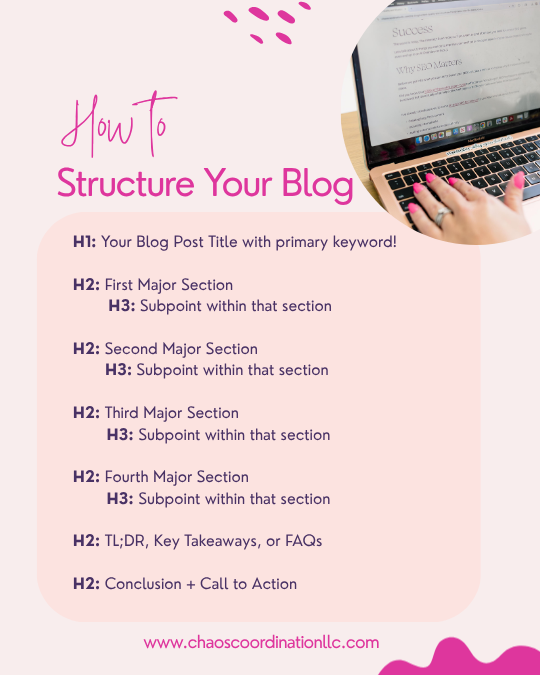
How to Structure Your Blog
H1: Your blog post title (include your primary keyword!)
Intro paragraphs. No heading, just 1-2 short paragraphs that hook the reader and set up the topic
H2: First major section: 2-3 paragraphs of content
H3: Subpoint within that section (if needed)
H2: Second major section: 2-3 paragraphs of content
H3: Subpoint within that section (if needed)
H2: Continue the pattern for each main idea
H2: TL;DR or Key Takeaways
H2: Call to Action
This blog structure example works for almost any topic and any industry. Just keep it consistent. For example, every H2 is a main idea, every H3 supports it, and the whole thing flows logically from start to finish.
Common Header Tag Mistakes to Avoid
Even with the best intentions, these slip-ups happen all the time. Keep an eye out for them as you write.
Using more than one H1. Your H1 is your title. There's only one title. Don’t confuse people.
Skipping heading levels. Don't jump from an H2 straight to an H4. Your header tags establish the hierarchy. Hierarchies flow in order for a reason.
Using headers just to make text bold. Headers are not decorative. If you want bold text, use bold text.
Stuffing keywords into every heading. Natural keyword placement is the goal. If it sounds forced, it probably is. And if you know me at all, you know I hate keyword stuffing with a burning passion of a thousand suns.
Writing headers that don't reflect the content below them. Every heading is a promise to the reader. Make sure the content delivers on it.
TL;DR: A Brief Lesson on Header Tags
Header tags (H1–H6) organize your content into a hierarchy for both readers and search engines.
Your title should be the only H1 on your page.
H2s are your main sections. H3s are subpoints within those sections.
Strategic keyword placement in headers helps search engines understand and rank your content.
Good structure improves readability, reduces bounce rate, and keeps readers engaged.
Use the blog structure example above as your go-to template for every post you write.
Ready to Connect Your Content Strategy?
Header tags are just one piece of the puzzle. If you want your blog posts, website copy, and email sequences to actually work together, instead of feeling like three separate things you're just trying to keep up with, I've put together a free resource that lays it all out for you.
👉 Download the free Content Ecosystem guide here and learn how to build a content strategy that runs like a well-oiled machine.